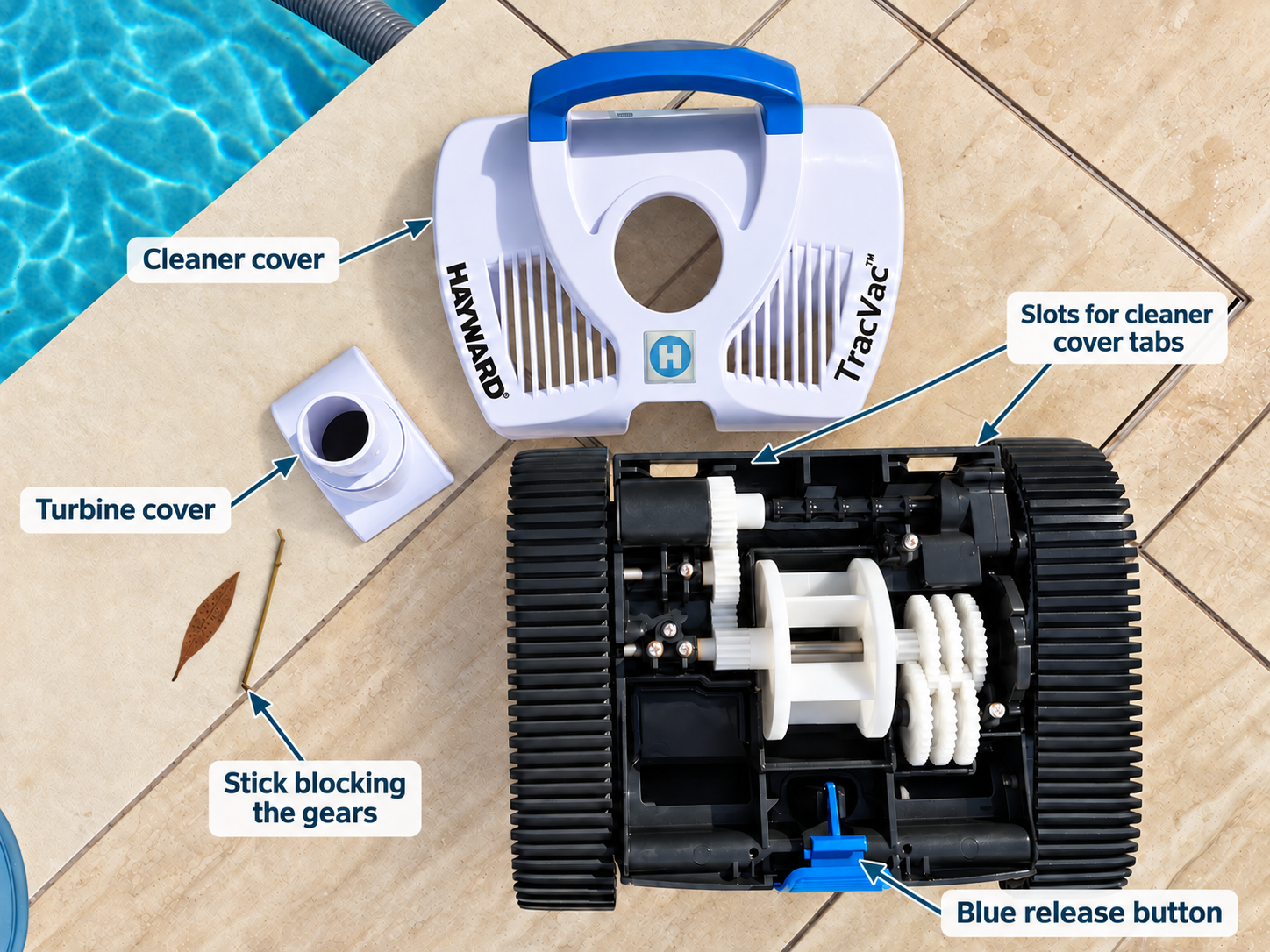
A small stick lodged in the gear mechanism stopped this TracVac from moving.
If your Hayward TracVac has stopped moving, first check that the pool equipment is running normally and that the cleaner is receiving good suction. A small piece of debris caught in the cleaner’s gears can also stop it from moving.
Check the pool equipment first
Before opening the cleaner, check that the pump is running and primed, and that the filter is operating normally. Check the skimmer basket and pump basket too. If the skimmer basket is too full, empty it.
Check the cleaner’s throat, hoses, skimmer plate and connectors for leaves or other obstructions. Make sure the hose connections are secure and look for a blockage or leak that could reduce suction.
If everything looks clear and the cleaner still will not move, check inside the cleaner for debris.
How to check the TracVac gears
Turn off the pool pump and chlorinator before disconnecting or opening the cleaner.
Pull the hose to the side of the pool and disconnect the cleaner head. Keep the end of the hose underwater so it does not drain.
Place the cleaner on the side of the pool and press the blue release button at the front. It is spring loaded and will pop up.
Remove the white cleaner cover, making sure the clips at the back come free from their slots.
Move the turbine cover aside and look at the gears for leaves, sticks or other debris that could be stopping them from turning.
A small stick, leaf, seed pod or other debrris can be enough to jam the gears and prevent the cleaner from moving. In one cleaner we checked, removing a stick from the gearing was all that was needed to get it working again.
While the cleaner is open, hold it by the handle and gently swish and dunk it in the pool water a few times. This can help flush out other small pieces of debris.
Put the cleaner back together
Replace the turbine cover in the correct position. Fit the white cleaner cover back on, making sure the two clips at the rear line up with the slots in the cleaner body. Gently press the cover down, then depress the blue release button to secure it.
Reconnect the cleaner head to the hose and turn the pool equipment back on. Check whether the cleaner moves normally.
If it still does not move
Recheck that the skimmer and pump baskets are clear, the pump is primed, and the cleaner throat, hoses, skimmer plate and connectors are free of obstructions. If the suction is still weak, there may be a blockage or leak elsewhere in the system. Worn or damaged cleaner parts may also need attention.
If you are on the Sunshine Coast and the TracVac still is not operating correctly, contact Clarity Pool Services for help checking the cleaner and pool equipment.