With practical advice from Matt at Clarity Pool Services.
Has a home water test or pool-shop test shown little or no chlorine in your pool?
There are several possible explanations.
Water may not be circulating properly, the output may be set too low, or the salt level may be outside the range your chlorinator needs. The cell could need cleaning or replacing. Sometimes the chlorinator is working, but the pool is using chlorine faster than it is being produced.
A low chlorine reading alone does not tell you which of these is happening. Start with the checks below to narrow down the cause.
1. Check that water is circulating
Your chlorinator needs water flowing through its cell to operate properly. The pump provides that flow, so a circulation problem can also stop chlorine production.
While the pump is running:
Check the pool returns. These are the outlets in the pool wall that send filtered water back into the pool. Look for water movement. If a return is within easy reach from the pool edge, hold your hand in front of it to feel the flow. Use a return outlet, not a suction fitting or drain.
Check the controller for a flow warning. Depending on the model, this might appear as “No Flow”, “No Water”, an error code or a warning light. Check the manual to identify the message.
Look through the pump's clear lid, if it has one. An unusually large amount of air, or a basket chamber that is not filling with water, can indicate that the pump has lost prime. This means it has lost the water needed to pump effectively.
A pump can make noise without moving water properly. If it is running without water, switch the system off if safe and get help. Do not open the pump or filter while running, or bypass a flow warning.
If return flow seems normal but a flow warning remains, have it investigated. Otherwise, move on to the settings.
2. Check the chlorine output and timer
A controller can be switched on while chlorine production is turned down or off. The output setting tells the unit how much chlorine to aim to produce; it is not a measurement of chlorine in the pool.
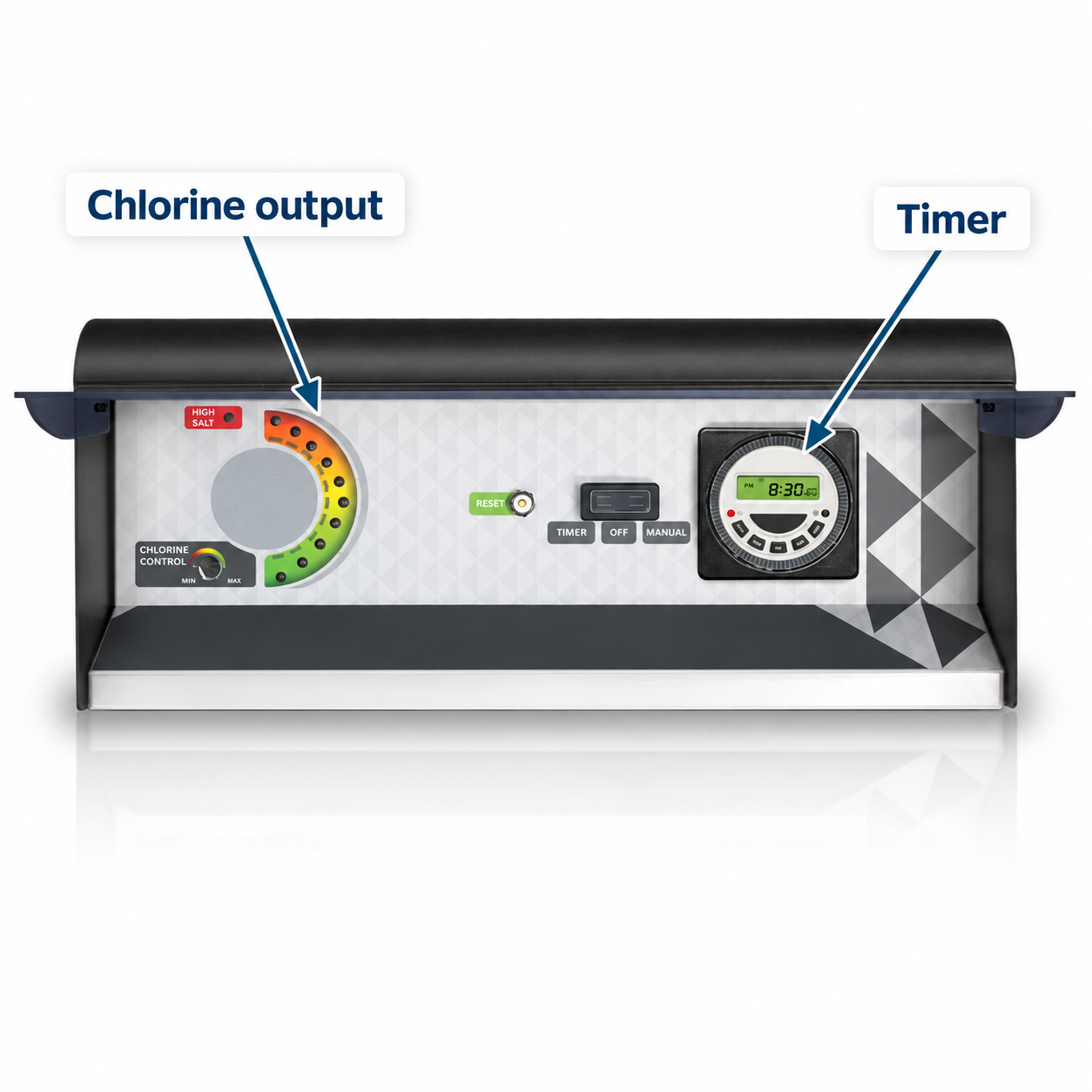
Pool Chlorinator Timer and Chlorine Output Controls
Chlorinator control unit: this example has an output dial, indicator lights and a timer. Controls vary by model.
Find the chlorine output setting. It may be shown as a percentage, a numbered level or an adjustable dial. Check that it has not been left at zero or a much lower setting than usual.
Check the clock and operating times. Make sure the controller shows the correct time and that its programmed periods match when you expect the system to run.
Check the operating mode. Look for an unintended off or standby setting. The names and controls vary, so use your model's manual if you are unsure.
Matt sometimes finds that owners have reduced the output during maintenance and forgotten to turn it back up. Correcting that setting may resolve the problem, but follow up with water testing to confirm chlorine levels recover.
There is no single output percentage or run time for every pool. Settings that worked in winter may need adjusting during summer or heavier pool use.
If the output setting looks correct but your pool still tests low for chlorine, continue with the checks below. Even a 100% setting does not, by itself, confirm that the cell is producing chlorine or keeping up with the pool's needs.
3. Check for warning lights or a tripped unit
Look at the controller while the system is scheduled to run. Is the display blank, is there a warning message, or has the unit shut down? Note the exact message and check its meaning in your model's manual.
Some chlorinators have a resettable circuit breaker; others have a fuse or electronic protection. If protection has stopped the unit, the cell may appear to have failed even though another issue caused the shutdown.
Matt also asks whether salt or other chemicals were added just before the problem started. Excess salt, or a concentrated dose passing through the cell, can overload some chlorinators. Do not pour salt into the skimmer box. Follow your model's instructions for adding salt and switching chlorine production off while it dissolves and circulates. A storm-related power surge can also cause a shutdown or damage.
Follow the manual's fault or reset procedure. Once the cause has been addressed, a user-accessible reset may restore operation. Follow any requirement to disconnect power first. A reset will not correct excessive salt or an unresolved fault.
Get help if it trips again, a fuse has blown, or the fault followed a suspected lightning strike. Leave the unit off and arrange an assessment. Do not open the control unit or keep resetting it. A tripped household safety switch (RCD) needs electrical investigation; do not assume salt is the cause.
If the controller appears to be operating normally, continue with the salt and cell checks.
4. Check the salt level and water balance
Use the water-test results to guide this step. If you have only checked chlorine at home, take a sample to a pool shop or arrange a full water test.
Compare the measured salt level with your chlorinator's specified range. Low-salt models and conventional chlorinators have different requirements. Do not add salt just because the chlorine reading is low.
Have pH and stabiliser checked as well as free chlorine. These help assess how effectively chlorine is working and how well it is protected from sunlight.
Tell the person testing your water about recent changes. Mention heavy rain, overflow, topping up and increased swimming use. These details help them interpret the results.
Low salt is a common problem Matt encounters, especially after pool water has been diluted. However, a low-salt warning can also have other causes, including scaling or a failing cell on some models. If the measured salt level is correct but the warning remains, get the equipment checked rather than adding more.
If the water has already turned green, ask for a recovery plan. Increasing the chlorinator output alone may not be enough. Our Mountain Creek green pool recovery shows how treatment, filtration and debris removal can work together.
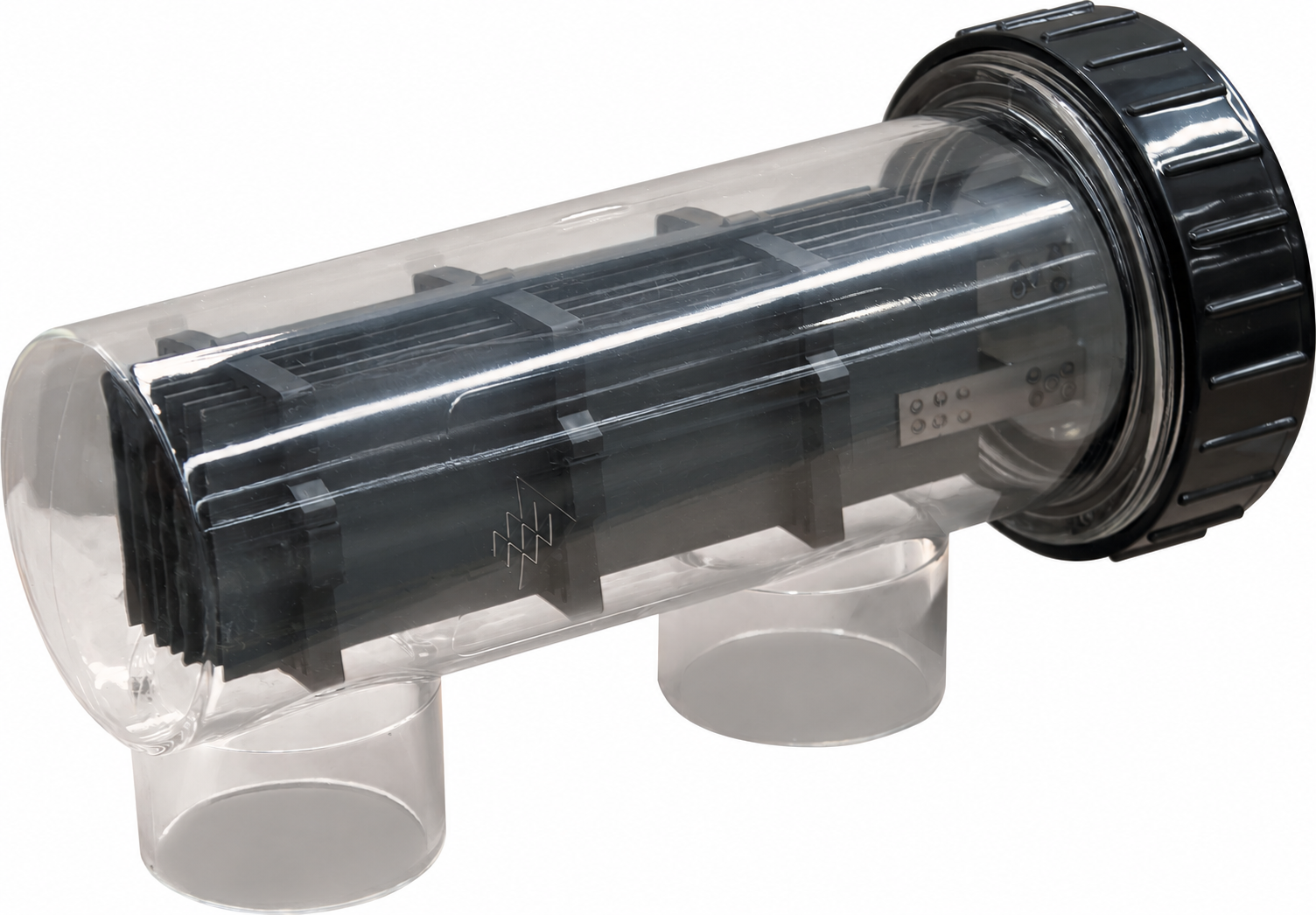
Pool Salt Chlorinator Cell
Chlorinator cell: the metal plates sit inside the clear housing connected to the pipework. This photo helps identify the part; it is not a guide to how much calcium is acceptable.
5. Look for build-up on the cell
Where the cell housing is transparent, look at the metal plates without removing the cell. Calcium deposits usually appear as a white coating. If the housing is cloudy or faded, you may not be able to judge the plates' condition from outside.
A small amount of calcium does not necessarily mean a fault. Matt often sees light deposits near the ends of the plates on cells that are operating normally. Even a self-cleaning cell can show some deposits.
Heavy build-up needs attention. If the plates are heavily coated or caked up, calcium can interfere with chlorine production. Arrange for the cell and water balance to be checked. Build-up alone does not prove that the control unit or self-cleaning function has failed.
Matt recommends leaving acid cleaning to a pool professional. Do not scrape the plates or improvise a cleaning mixture, as this can damage their coating.
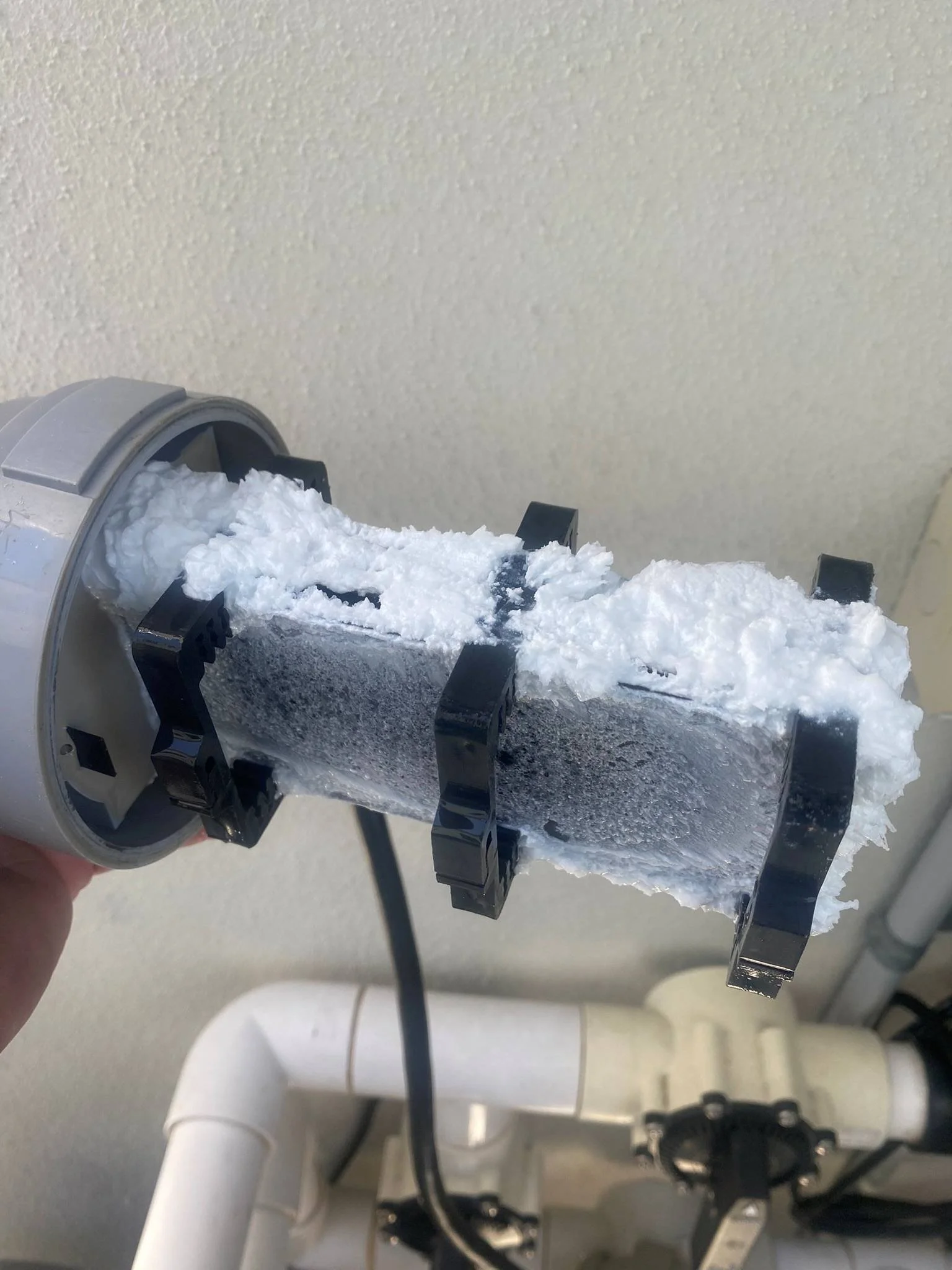
Chlorinator cell from a client’s pool in Birtinya, showing heavy white calcium buildup across the cell plates before cleaning treatment.
Cleaning may restore the performance of a scaled cell. It will not restore a worn-out coating, and a cell that looks clean can still need testing.
6. If chlorine is still low, review demand and arrange testing
If circulation looks normal, salt is in range and the cell is not heavily scaled, the chlorinator may still be producing less chlorine than the pool needs. Sunlight, increased swimming use and algae can increase chlorine loss or demand. Too little stabiliser can also leave chlorine less protected from sunlight.
Take your latest water-test results, daily operating hours and output setting to your pool shop or technician. Ask them to check whether the settings and water balance suit current conditions before concluding that the cell needs replacing. After any adjustment, follow their advice on when to retest and confirm that chlorine levels are recovering.
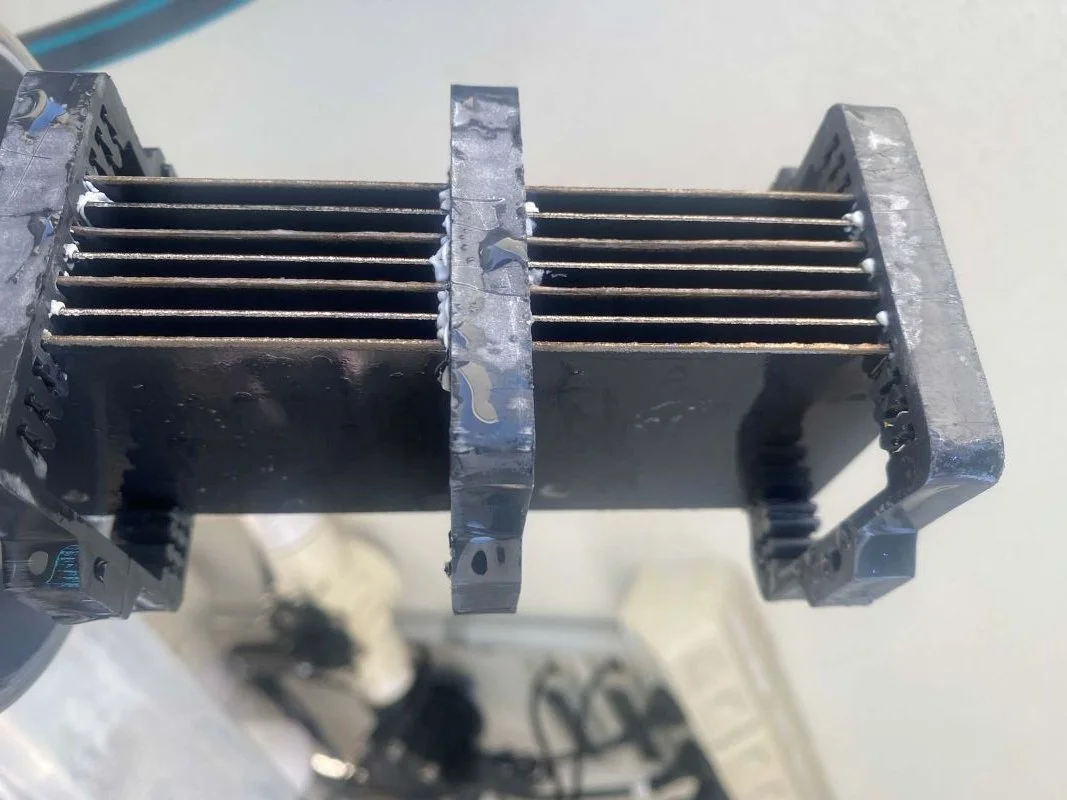
The chlorinator cell after cleaning treatment, with the heavy calcium buildup removed and the gaps between the plates clear again.
If there is little or no chlorine in the water, also ask whether treatment is needed to restore the level while the cause is investigated. Simply waiting for the chlorinator to catch up may not be enough.
If these checks do not explain the problem, arrange testing of the cell and control unit. Internal electrical testing should be carried out by a qualified electrical technician.
Matt considers the condition of the whole system before recommending replacement. A worn cell may need replacing while the rest of the chlorinator remains usable. An older control unit kept in good condition may still be worth repairing. The decision depends on the fault, parts costs and likely reliability after the work.
Clarity Pool Services provides pool equipment repairs on the Sunshine Coast and can help work out what needs attention.
Request a service or call 0400 976 004. Have your water-test results, chlorinator brand and model, and any warning messages ready. These details help Matt understand the problem before a visit.